


Where is the FIFA World Cup broadcasted?
The FIFA World Cup is broadcasted on the below channels. Search on your receiver for the old channel name or the old channel number.
| New Channel | Old Channel | Old Channel Number | New Channel Number |
|---|---|---|---|
| beIN SPORTS MAX 1 | beIN SPORTS MAX 1 | 314 | 701 |
| beIN SPORTS MAX 2 | beIN SPORTS MAX 2 | 318 | 702 |
| beIN SPORTS MAX 3 | beIN SPORTS MAX 3 | 320 | 703 |
| beIN SPORTS MAX 4 | beIN SPORTS XTRA 8 | 322 | 704 |
| beIN SPORTS MAX 5 | beIN SPORTS XTRA 3 | 317 | 705 |
| beIN SPORTS MAX 6 | beIN SPORTS XTRA 7 | 321 | 706 |
I don’t see the beIN Max Channels
If the channels are not found, you can follow the below steps:
- Hybrid 4K STB: The channels will appear only after rebooting the STB, with the new LCN applied.
- Vestel STB: The channels will appear after rebooting the STB. You need to search the channels by name and not by number.
- Bestsat STB: The channels will appear with the new name and new LCN by pressing the scan button on the remote control. If the channels are duplicated, a factory reset is required followed by a scan. Check the below steps based on your receiver type.
- CV+ Devices: The channels will appear directly after login to the application on all device types.
How do I scan for new channels/recover missing channels?
Please check the steps needed for the below receivers:
1. TopField, Vestel 1 & Vestel 2 Receivers
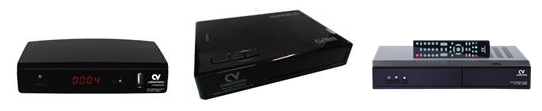
To scan for new channels or recover missing channels, kindly follow the steps below:
Fast Scan
- On your remote control, press the blue button.
- Select "Auto Search" and press "OK".
- Select "Yes" to delete all existing channels.
- Wait for the scan to finish.
If some channels are still missing after performing the Fast Scan, kindly perform the following:
Menu Scan
- Press "Menu".
- Select "Dish Setup" (press "OK").
- Enter PIN: 1111.
- Select "Cablevision" (press "OK").
- Press "Star 1" ("Favorite 1").
Check the menu on the right-hand side:
- LNB Type: "9750/10600"
- LNB Power: "13/18 V"
- 22KHz: "Auto"
- Toneburst: "None"
- Disecq1.0: "None" (if only Cablevision dish is installed)
- Disecq1.1: "None" (if only Cablevision dish is installed)
2. BestSat Receiver
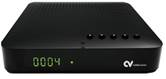
Menu Scan
- Press "Menu".
- Go to "Installation" (press "OK").
- Select "Antenna Setting" (press "OK").
- Select "Cablevision or ECOnet" (press "OK").
Check the menu:
- LNB Type: "9750/10600"
- LNB Power: "13/18 V"
- 22KHz: "Auto"
- Disecq1.0: "Off" (if only Cablevision dish is installed)
- Disecq1.1: "Off" (if only Cablevision dish is installed)
- Select "Start Search" (press "OK")
- Select "Search" (press "OK")
3. Strong Receiver
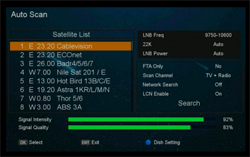
Auto Scan
- Select your current satellite (Cablevision or ECOnet) and press the ▶ button.
- Move the focus to "Search" and press OK to start the search.
- Strength and quality should be above 60%.
- LNB Power: Auto.
- FTA Only: No.
- Scan Channel: TV + Radio.
- LCN Enable: On.
4. Hybrid 4K Smart Box
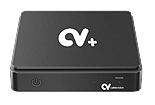
- Open the Cablevision app and press OK.
- Press the Down arrow and select Settings, then Satellite Search.
- Select Satellite Setup and choose Cablevision or Econet depending on your dish setup.
- Keep the same settings for LNB Type, Frequency, Satellite Type and Satellite Port, then press OK.
- Wait until Channel Search reaches 100% and press Watch Now.